
Virtually all laptop speakers suck. It’s the one area where even really expensive laptops tend to fall on their ass, leaving users with a tinny, harsh, and hollow sound experience. While you can’t exactly overcome physics – laptop speakers are necessarily small and thus just cannot ever sound as good as proper speakers – there’s a lot you can do with proper tuning and software magic. If you’re a desktop Linux user, you actually already possess all the plumbing needed to fix your audio; it’s just not exposed to you in any way. Luckily, an application called EasyEffects allows you to actually make use of desktop Linux’ advanced audio features to massively improve the sound quality of your laptop’s speakers.
The OSNews 2026 Fundraiser
➡️ Donate through Ko-Fi ➡️ Donate through SEPA transfer* ➡️ Buy merch from our store ➡️ Why a fundraiser?
€5000 incentive: Make me use Windows 11 for a month (the results were not great)
> €10000: Video tour of my office and my computers/devices collection <
€15000: Buy a Mac and use macOS for a month (and review it)
€20000: I get an OSNews tattoo
*Name: Thom Holwerda – IBAN: SE08 8000 0820 1684 4657 8414 – BIC: SWEDSESS
EasyEffects’ own description on its GitHub page doesn’t really explain what it does or what it’s capable of, so here’s the description from Wikipedia instead.
EasyEffects uses PipeWire to process incoming and outgoing audio streams independently and can apply various sound effects in the form of plug-ins made by different developer teams such as Calf Studio Gear, MDA.LV2 and GStreamer. All plugins have their own presets and can be applicable inside the suite rather than having to use a different mixer or executing a script from the command line.
Available output effects are limiter, auto volume, compressor of dynamic range, filter, 30 bands parametric equalizer, bass enhancer, exciter, reverbation, crossfeed, delay, maximizer and spectrum analyzer. Available input effects are WebRTC, limiter, compressor, filter, equalizer, de-esser, reverbation, pitch shift and spectrum analyzer.
↫ EasEffects’ Wikipedia page
None of this matters, and you can forget everything from these two paragraphs.
What matters is that using EasyEffects, you can tune the audio coming out of your speakers to make them sound a lot better. The few laptops on the market that do have decent audio – MacBooks, some Dell XPS laptops, and surely a few more – aren’t magically defying physics. While they probably do have objectively higher-quality speakers, the main difference between those laptops and laptops with crappy-sounding speakers is that the former come with built-in tuning from the factory to make them sound much better than they would without any software trickery.
If you know your way around audio, you can very much use EasyEffects and tune your laptop speakers from scratch to massively improve how they sound. However, that requires time, experience, knowledge, and expertise that most people lack, including myself. Lucky for us, though, there are countless downloadable presets out there for EasyEffects designed specifically to make laptops sound better.
In an ideal world, you’d pick a preset created specifically for your laptop make and model, but odds are you won’t find one, so for most laptops you’ll have to settle for a generic preset that tries to do its best. I’ve long settled on the Advanced Auto Gain.json preset from JackHack96, which greatly improves the audio performance on any laptops I’ve tried it on, but of course, there’s countless other presets for you to try to see if there’s anything that suits your particular laptop and ears better.
Getting all of this up and running is really easy. EasyEffects is most likely packaged by your Linux distribution, and the latest version is always available as a Flatpak from Flathub. Download the preset(s) you want to try, copy them either to ~/.config/easyeffects (if you use your distribution’s package) or to ~/.var/app/com.github.wwmm.easyeffects/data/easyeffects/output/ (if you use the Flatpak version). They’ll show up right away in the Presets tab in EasyEffects, ready to be turned on and off whenever you want, making it very easy to compare and contrast to find the one you like best. EasyEffects can live in your system tray giving you easy access to your presets without having to open the main window, and it can be set to start automatically at boot. EasyEffects can also be turned on and off on the fly.
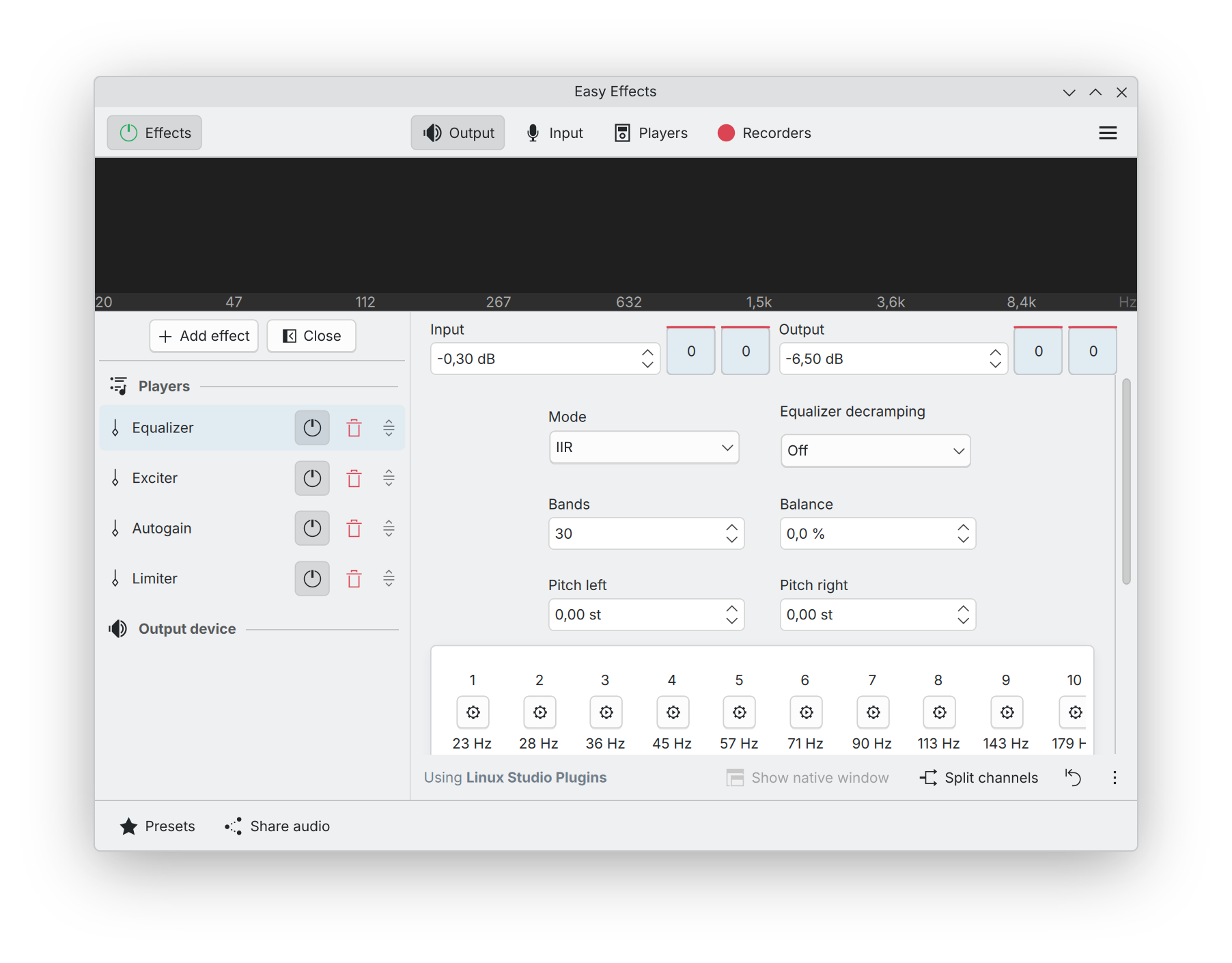
There’s obvious downsides to all of this, too, of course. First, since you’re most likely going to be using a generic preset not specifically crafted for your laptop, there’s no guarantee the results will be positive for you. Second, not every preset is ideal for every type of audio. Most of my audio consists of YouTube videos with mostly speech; if you listen mostly to music, different presets may yield better results. Third, audio quality is deeply subjective, and what sounds good to my ears may sound like total garbage to yours. Fourth, EasyEffects does take up a tiny fraction of CPU power (I’m talking 0.1-0.2% according to KDE’s System Monitor), but I have never seen it have any noticeable performance impact on anything.
Even the generic preset I use makes such a massive difference for me on every laptop I’ve ever tried it on, that I’ve become convinced EasyEffects and a few of the generic presets should be installed by default by any desktop-oriented Linux distribution. On top of that, Linux laptops OEMs like System76, Nova Custom, Star Labs, and so on, should really take the time to create proper presets for their laptops to improve their sound quality out of the box. I feel like if you’re already designing and selling laptops, you probably also have the skills and means to create a decent preset.
In fact, I’d take it a step further and urge desktop environments like KDE and GNOME to properly integrate EasyEffects into their sound settings. They shouldn’t include the entire application and its user interface, but should make it so that you can configure and manage presets right from the sound settings panels, and switch between presets from their volume applets (as well as turn it off entirely, of course). This would leave the full EasyEffects application for people who need more control, manual tuning, and more advanced features.
There’s absolutely no reason why speakers on Linux laptops should sound tinny, harsh, and hollow. The Linux desktop has all the technologies and features built right in to make speakers sound much better than they do without any tuning, and yet, very few people seem to actually be aware of this. This needs to change, and I think it’s up to distributions, desktop environments, and Linux OEMs to make this happen.

You may be interested in this process for DSP corrections, as well as the notes on deviations from a flat frequency response some people prefer: https://noaudiophile.com/DSP_Corrections/
While I agree on the improvements in Sound Quality, someone should also have an eye on the (necessary) CPU consumption. Especially when using a Laptop, I actually do care about it and EasyEffects does not come cheap. (I am not criticizing here, the math is expensive. Just pointing on the side effects.)
To me, Laptop means travel light weight and long distance without charging. Quality/comfort means desk with work station and large screens. First one can’t afford it, second one does not need it.
I agree 100%.
Even in Windows, the Lenovo/Dolby/Realtek service for audio quality (fortemedia whatever) uses a lot of CPU all the time and reduces battery life significantly. In Windows, the stupid search indexer LOVES to kick in at the wrong time. Sometimes I see my battery life down to only 2h and you get the lovely indexer running eating all your CPU (hey, you are just typing, so WHY DONT I USE CPU FOR USEFUL WORK RIGHT NOW), leading to thermal castration on my laptop.
Be it Windows or Linux, spending a bit of time disabling non-essential services increases battery life 20-30% on my ThinkPad P1 Gen 4. And I still get the best overall battery life on FreeBSD, most probably because there are very few things running in the background so probably the CPU gets to stay in a low power state for longer.
Also disabling fade-ins and outs, transparencies, etc, also increase battery life a little bit (small but non-negligible amount).
The indexer is the first thing I disable, when I’m forced to use windows.
I’ve been disabling it since Windows 95.
it’s slow as hell, never finds anything remotely related to the search string, and uses a lot of cpu for nothing. But then Windows in general is good for nothing, so it’s small wonder nothing ever works properly.
I read recently they claim to have improved it. Improving a piece of sh*t? What do we get… diarrhoea?
Peak Windows search was Windows 95. The search window gave a nice selection of parameters (contents, date creation/modification range, expected location, type) and you would push search. If that’s what Microsoft would index and expose those options at the UI, it would be perfect.
EasyEffects and the like: the DIY Dolby Atmos of the Linux world.
That said, on my dirt-cheap Acer Swift 1 with its measly N6000 CPU, I ended up going with JamesDSP instead (https://github.com/Audio4Linux/JDSP4Linux): it lets me run a decent (to my ears) custom preset with a 31-band EQ, stereo enhancement and dynamic bass boost at around 1% CPU usage, while EasyEffects eats about 6% with no effects loaded. And as a bonus, I find JamesDSP’s UI much more straightforward.
There are some trade-offs though: JamesDSP’s community is much smaller, and the number of presets and support resources doesn’t quite compare. Updates are also pretty sporadic, and the more approachable interface means giving up some flexibility if you’re into building highly customized presets.
Still, if EasyEffects isn’t quite your thing for whatever reason, be it too CPU-heavy for your toaster or about as intuitive as an airplane cockpit, JamesDSP is definitely worth a try!
You should really listen to a the sound produced by Apple’s macbook pro 16”. It’s amazing, the bass are great, trebles are clear.
https://www.reddit.com/r/macbookpro/comments/1f15esp/the_speakers_on_the_14_macbook_pro_are_out_of/
@djame: Yes, Apple users are renown for paying through the nose for aesthetic accoutrements. Using Linux to overwrite mac OS X/macOS on old x86_64 Macs is a great way to keep them alive for years to come! Fedora Asahi Remix is also a great solution for Apple Silicon Macs (M1 – M4).
CajunMoses,
I think Asahi is important however the reverse engineering process has been slow and is years behind new products. This is by no means the fault of Asahi devs, reverse engineering apple’s proprietary hardware is just a lot of work. So unless you want to run an older M1 or M2, newer models aren’t fully supported. M3 is “almost ready” for official release.. Most M4 and M5 hardware still doesn’t work…
https://linuxiac.com/asahi-linux-nears-official-support-for-apple-m3-macs/
Since I’m not looking to run macos at all, any mac PC I bought would need to support linux on day 1. This might not be a deal breaker assuming older hardware is otherwise good enough, but other shortcomings of apple products are deal breakers for me. Like soldering the SSD so that it cannot be replaced or upgraded. This is just regressive engineering and the opposite of what I look for in hardware.
I’ve tried installing GNU/Linux on a iMac. The sound is noticeably worse.
What a weird answer. I’m talking about the speakers quality on the macbook sillicon lines (m1/m…) which is miles above what we had on the intel macbook pro. What does it have to do with premium prices and such ?
The team behind MacBook support implemented DSP to even introduce “fake bass”, so user hears sounds physically impossible to play. And they have another daemon which models amount of energy going through the speakers and resulting temperature.
Crazy stuff: https://asahilinux.org/docs/sw/audio-userspace/
I dont want distro makers the idea that this is universaöly available. I want to keep using pure alsa without pötteringware or pipewire required. The latter is really good on some of my hardware, but making it default on every distro seems like a bridge too far.
I don’t get why I would like to have good sound coming out of laptop speakers. I’m either on the road, and listen through headphone/earbuds/whatever so not to annoy people around me, or I’m docked at work or home, in which case I use a headset or some decent stereo speakers.
jalnl,
I don’t have much need for great audio either, however that’s just because I don’t use my laptop that way. If I regularly used laptop to play music/movies/etc, then it would be important. Bad sounding speakers emitting tinny or overblown sounds can make for an irritating experience.
IMHO decent audio hardware shouldn’t depend on software post processing running on the CPU; a laptop should reproduce the waveform faithfully (within the driving hardware’s constraints) out of the box. However in reality I suspect that most consumer grade hardware is just never calibrated at the factory. It’s a lot like displays – you get what you get and it’s up to software to provide calibration features. Even image formats that contain calibration profiles often get ignored in practice.
And then sometimes people might actually prefer more processed audio over realism. It’s funny how things work.
e.g. better to have good sound for sharing a conf call on your laptop in a pinch with workmates…
In any case good sound doesn’t hurt