
With Windows being as old and long-running as it is, there’s a ton of old and outdated bits and pieces lurking in every nook and cranny. I have always found these old relics fascinating, especially now that over the past few years, Microsoft has attempted to replace some of those bits and pieces with modern replacements (not always to great success, but that’s another story). One of those parts of the UI that’s been virtually unchanged since the release of Windows 95 is the Run dialog, but that’s about to change: Microsoft has released a completely new Run dialog to early testers.
Windows Run, also known as the Run dialog, is a surface that has been around for over 30 years. It has become a heavily relied upon tool for developers and advanced users alike. Users have decades of muscle memory where they hit
Win+R, navigate through their Run history, and hit Enter to quickly access various paths and tools. We all have our favorite tool we launch there as well. For us, some of our favorites arewt(Windows Terminal),mstsc(Remote Desktop) andwinword(Microsoft Word). But it’s more than jUsT a TeXt BoX tHaT rUnS tHiNgS. The Run dialog can handle navigating both local and network file paths as well. And everything it does, it does fast.Win+Ropens the run dialog seemingly instantly.If we wanted to modernize the Run Dialog to fit the modern Windows 11 design style, we had to make sure it did everything just as well as before. We needed to maintain the same performance while also keeping the user interface minimal, just as Windows 95 intended.
↫ Clint Rutkas at the Microsoft Dev Blogs
The new Run dialog looks like it belongs in Windows 11, which is a nice improvement, but the most important part is that they actually seem to have made it a little faster. Sure, they may have only shaved off a few milliseconds from its opening time, but considering virtually everything else they’ve touched in Windows over the years got considerably slower, that’s a good showing for Microsoft. The new feature they’ve added is that by typing ~\, you can open your home directory. The one casualty is the browse button, which according to Microsoft’s data, literally nobody ever used.
I know it’s just a small thing and in the end not even a remotely consequential one, but with an operating system as old and storied as Windows, replacing these ancient parts that millions of people rely on every day absolutely fascinates me. There must be a considerable amount of pressure on the people developing something like this new Run dialog, especially with Windows’ reputation being at one of its lowest points, so it’s good to see them being able to deliver.
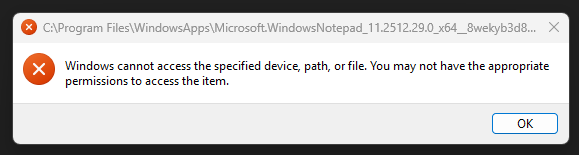
The new Run dialog is available today for testers, and if you’re on the Windows Insider Experimental Channel, you can enable it in Settings > System > Advanced. Coincidentally, on my Windows 11 machine that I use for just one stupid video game, this Advanced page displays a loading spinner for five minutes and then just dies. Also, Notepad won’t start (one time it showed this dialog), and using the terminal to load it causes the old Win32 version of Notepad to open after 5 minutes of waiting, which then hangs and crashes.
People pay money for this.

Looks sort of like the included-by-default theme for Launchy that I use on my Windows 7 “game console but not a console” machine… I had to set a registry tweak to turn off all Win+… bindings in order to free up Win+Space from its unprecedentedly useless default binding so I could match my Linux muscle memory.
(I think it might have been “peek at desktop”. It’s been a while.)
Nice to see Microsoft finally catching up with 2007.
What boils my blood is that it probably took 100ms on my OG Windows 95 machine: a Pentium 75 with 8MB RAM.
There must be some AI function introduced. I don’t believe microslop just introduced a plain run box without any copilot stuffed into it. Maybe they’ll enable it in some H2, after the initial reaction to the change dies away.
Once again they leave power users in the behind
This is an “I am new to statistics, and I learned to cite some fancy numbers” level thinking. It misses on two points. Sample methodology, and reasoning.
I won’t go into details, because I don’t need to. Their second sentence clearly exposes their frame of mind.
What does this mean?
“We looked at how most people use the Run dialog. It is just an empty text edit which can be used to clean HTML and Rich text in copy-paste”
That is basically Ctrl-Shift-V replacement for programs that don’t have it. Not a fundamental functionality of a Run dialog.
So, instead of saying “why our users don’t actually use the Run dialog for what it is?” they said “how can we make it better for those who misuse it”?
Btw, 93 ms… is an abomination. Better than >100, but still nowhere near it should be (single digit)…
(Self reply)
For those who are not Windows power users…
The “Browse” in the Run dialogue is the last refuge in a stuck system where Explorer is unresponsive or has crashed.
It can be initiated from the Task Manager (which always responds to a keyboard shortcut), and then using Run one can still do rudimentary file exploration and management, sometimes even getting Explorer back to running state.
This is like removing the lifeboats from Titanic, since “they are rarely used”
They are really blinded by “telemetry data”.
Ouch
This browse feature I have never thought of, but it is immensely cool
msgnr,
Yes, that is pretty useful. But unfortunately those kinds of “tricks” are no longer promoted.
If you were to visit a Windows centric website they could have tips on 100 random things, but very few that are actionable.
100ms sounds impressive until you realize what a modern PC does in such a short time:
– execute > 4 billion instructions
– read > 10 GB of data from RAM
– access its SSD > 200000 times
– read 1.5 GB of data from the SSD
– display >6 frames on the monitor
No, 0.1 seconds is not fast.
Not for such a primitive task.
I dont know what people want in a run dialogue. For me the one included in amiwm is just fine. Sure it is neat to have history as well, or maybe spelling correction. I don’t want search however in the run dialogue, for that another thing should be used in my view.
Usually it is for pro users and for games. I use it as a shorthand when I want to run batch files from cmd or when I want to use %appdata%. win+R then hit enter and the last command that I usually need this for is right there.
The run dialog should be as dirt simple as possible, relying on the least amount of external APIs and using the least amount of resources.
Like CMD, or Task Manager, there will be times when that tiny dialog is the difference between a complete system resurrection and a total wipe and reformat. I’m not going to be happy if i can’t use it because it has some hard coded dependency on a “bells and whistles” search function etc that is not working because the system crapped itself.
I don’t think that the run dialog needed a new design, especially when the Search bar has the same functionality and it is always visible. But the real beauty of windows lies in that every path bar in the windows is also a run dialog and it even allows you to open a terminal with the current folder.