
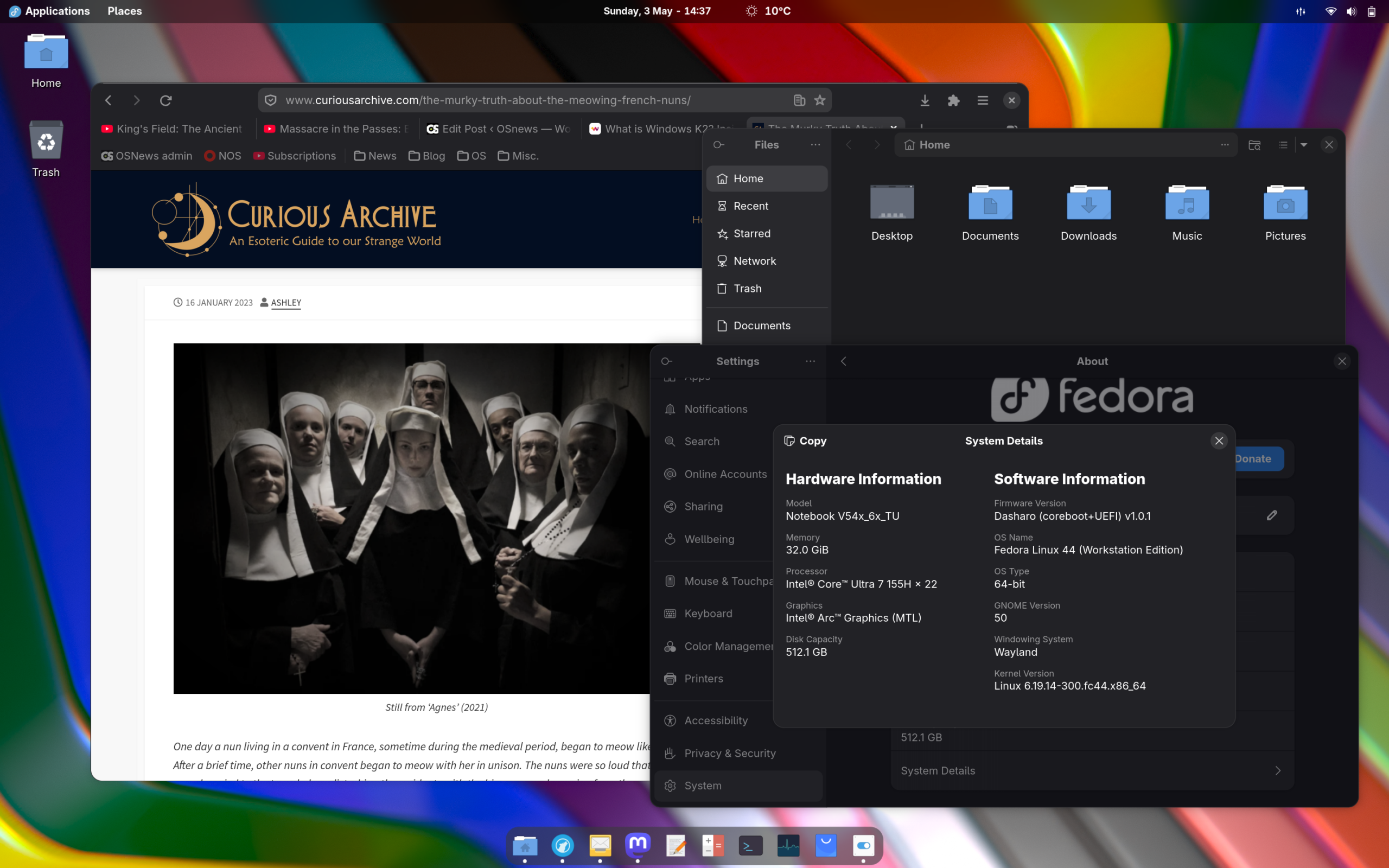
While I’m normally a KDE user, I do keep close tabs on various other desktop environments, and install and set them up every now and then to see how they’re fairing, what improvements they’ve made, and ultimately, if my preference for KDE is still warranted. This usually means setting up a nice OpenBSD installation for Xfce, Fedora for GNOME, and less often others for some of the more niche desktop environments. Since GNOME 50 was just released, guess who’s time in the round is up?
Since everybody’s already made up their mind about their preferred desktop eons ago, with upsides and downsides debated far past their expiration date, I’m not particularly interested in reviewing desktop environments or Linux distributions. However, after asking around on Fedi, it seemed there was quite a bit of interest in an article detailing how I set up GNOME, what changes I make to the defaults, which extensions I use, what tweaks I apply, and so on.
Of course, everything described in this article is highly personal, and I’m not arguing that this is the optimal way to tweak GNOME, that the extensions I use are the best ones, or that any visual modifications I make are better than whatever defaults GNOME uses. No, my goal with this article is twofold: one, to highlight that GNOME is a lot more configurable, extensible, and malleable than common wisdom on the internet would have you believe. It’s not KDE or one of those cobbled-together tiling Wayland desktops, but it’s definitely not as rigid as you might think. And two, that GNOME is good, actually.
Tools of the trade
The first thing I do is install a few crucial tools that make it easier to modify and tweak GNOME. I really dislike lists in articles, but I will begrudgingly use one here:
- GNOME Tweaks: this tool gives you easy access to some hidden settings, most notably to easily switch themes.
- Extension Manager: the easiest way to find, install, update, and manage GNOME extensions. With this application, you won’t need to use the browser for extensions at all.
- dconf Editor: a tool to fiddle with even more obscure GNOME settings.
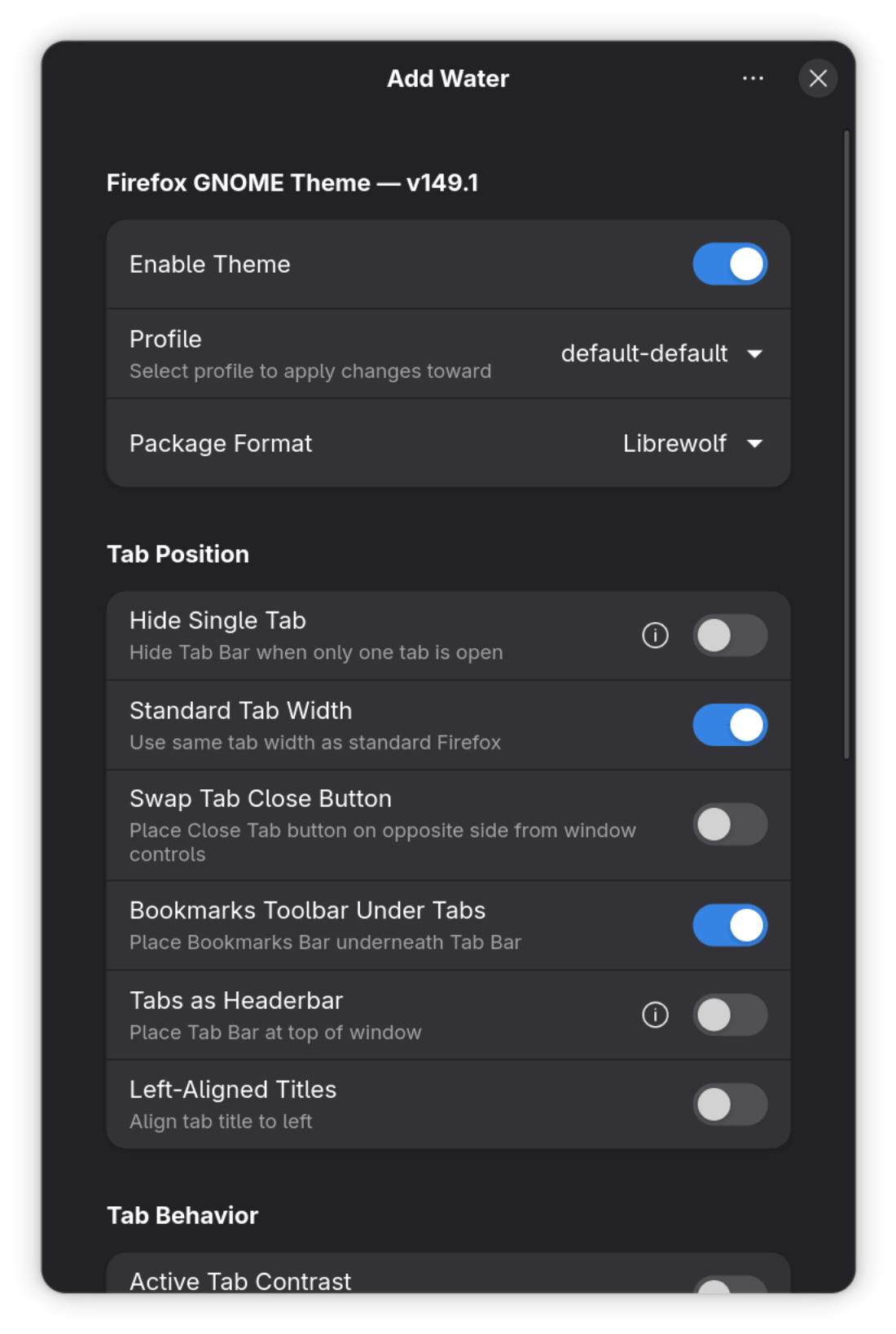
- Add Water: an application with an odd name, designed entirely to easily install and update the Firefox GNOME Theme, which transforms Firefox (or LibreWolf, in my case) into something that much more closely resembles a GNOME/libadwaita application.
After installing all of these tools, the actual tweaking can commence.
Visual tweaks
I didn’t use to like GNOME’s Adwaita visual style, but over the years, it started growing on me to the point where I don’t actively dislike it anymore. With the arrival of libadwaita, it has also become effectively impossible to theme modern GNOME applications, so even if you do change to something else, many of your applications won’t follow along. If consistency is something you care about, you’ll stick to Adwaita, but that leaves one problem unresolved: applications that still use GTK3. These applications will follow a much older version of Adwaita, making them stand out like eyesores among all the modern GTK4 stuff.
Luckily, since GTK3 applications are still properly themable, this is easily fixed: just install the adw-gtk3 theme, either by hand, or through your distribution’s repositories. To enable it, first install the user themes extension through Extension Manager, and then enable the theme in GNOME Tweaks for “Legacy Applications”. Any potential GTK3 applications you still use will now integrate nicely with modern libadwaita applications.

The one part of GNOME I really do deeply dislike is its icon theme. I can’t quite explain why I dislike this icon set so much, but it runs deep, so one of the very first things I do is replace the default GNOME icon set with my personal favourite, Qogir. This is a popular icon set, so it’s usually available in your distribution’s repositories, but I always install it from its GitHub page. Changing GNOME’s icon set is as simple as selecting it in GNOME Tweaks. You can’t get much more personal taste than an icon set, and there are dozens of amazing sets to choose from in the Linux world. Changing them out and trying out new ones is stupidly easy, and it’s definitely worth looking at a few that might be more pleasing to you than GNOME’s (or KDE’s) default.
Lastly, I open Add Water and enable the amazing GNOME theme for LibreWolf. Add Water basically makes this as easy as flipping a switch, so there’s no need to copy any files into your LibreWolf profile or whatever. The application also provides a few more small tweaks to fiddle with, like enabling standard tab widths so tabs don’t grow and shrink as you close and open tabs, moving the bookmarks bar below the tab bar, and many more.
Extensions
Since the release of GNOME 3 in 2011, extensions have been the most capable way to modify GNOME’s look, behaviour, and feature set. As far as I can tell, while the extension framework is an official part of the GNOME Shell, the extensions themselves are all third-party and not part of a vanilla GNOME installation. By now, there are over 2800 listed extensions, but that number includes abandoned extensions so it’s hard to determine the actual number of currently-maintained ones. Whatever the actual number is, there’s bound to be things in there you’re going to want to use.
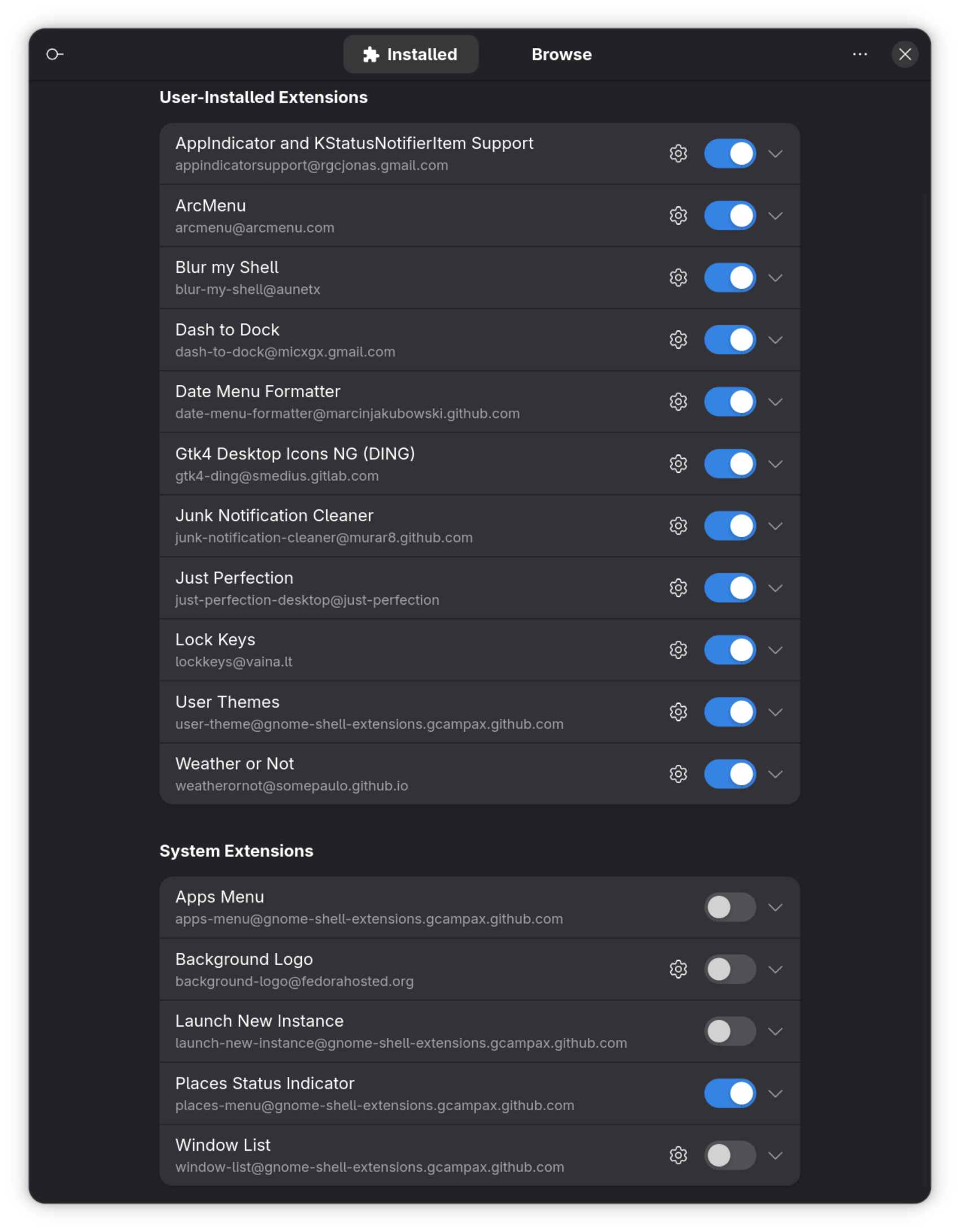
Here are the extensions I have installed. Let’s just start at the top and work our way down. I guess I’m forced to do another list.
- AppIndicator and KStatusNotifierItem Support: for reasons that are clearly beyond my limited understanding of the world, GNOME does not support AppIndicators, KStatusNotifierItems, and legacy system tray icons. This must-have extensions fixes this inexplicable omission.
- ArcMenu: a very configurable application/Start menu kind of thing. Has tons of options and preconfigured layouts, and is an absolute must for me as I’m a basic guy whose second GUI was Windows 95.
- Blur my Shell: as the name implies, adds a nice configurable blur effect to various parts of the GNOME shell. An entirely aesthetic thing that adds little in functionality.

- Dash to Dock: adds a dock to GNOME. An absolute 100% must for me. I used Mac OS X back when it didn’t suck (10.2-10.6), and my love for the dock metaphor is one of the few things from that time that stuck.
- Date Menu Formatter: GNOME is remarkably limited and rigid when it comes to configuring locale-related settings, as it forces you to adopt every individual aspect of a locale (contrary to KDE, which has a very detailed settings screen for every aspect of locale). Even though I’m Dutch and live in Sweden, I always use all my software in US English, which in the case of GNOME also means adopting things like US currency, date formats, and so on. This little extension allows me to manually format the date in the top bar to be actually readable.
- Gtk4 Desktop Icons NG (DING): GNOME does not support desktop icons. I think this is a bizarre design decision. This extension brings desktop icons back, with a nice collection of settings to adapt them to your needs.
- Junk Notification Cleaner: whenever an application receives a notification, GNOME puts them in its notification center in the top clock menu. Sadly, this is also the only place where you can dismiss them. With this extension, you can set it so that the notifications of an application are cleared when you focus its window, close it, or both. I set it to both.
- Just Perfection: this extension provides you with a massive set of toggles and switches to change tons of little aspects of the GNOME Shell. I use to hide a slew of buttons and toggles from the clock and top-right menu on the top panel that I never use, as well as to move the notification OSD to the top-right.
- Lock Keys: ads a little Caps Lock icon in the top panel when Caps Lock is engaged. Very useful, especially when your keyboard lacks indicator LEDs.
- User Themes: allows you to set GNOME Shell themes from your home directory.
- Weather or Not: one of the many extensions that adds the weather to the top bar. We have two toddlers and live in the Arctic – we absolutely must have frictionless instant access to the current outside temperature.
- Places Status Indicator: puts a menu in the top bar with some frequently used locations.
There are countless more extensions to choose from, and you’re definitely going to find things you never even thought could be useful.
Miscellaneous tweaks
There’s a few other things I modify. In GNOME Tweaks, I make it so that double-clicking a window’s titlebar minimises it while right-clicking it lowers it; two features I picked up during my years as a BeOS user that I absolutely refuse to give up. I configure the dock from Dash to Dock so that it always remains on top and never hides itself, no matter the circumstances. In Settings, I disable virtual desktops entirely (I don’t like virtual desktops), and I make sure tap-to-click is disabled (if I’m on a laptop).
GNOME is good, actually
After making all of these changes, I feel quite comfortable using GNOME, at least on my laptop. It’s a nice, coherent experience, and offers what is probably the most polished graphical user interface you can find on Linux, even if it isn’t the most full-featured. The third-party application ecosystem, through modern libadwaita applications, is also quite healthy, moreso than what you find on KDE. To get there, however, I need to make a lot of changes to fix, undo, or work around some of the more… Peculiar defaults in GNOME, primarily through extensions.
And I think this is a problem.
The GNOME extension ecosystem is lively and active, but it also highlights a potential shortcoming of GNOME. I don’t think I’ve ever seen anyone use GNOME without extensions, and it’s honestly not hard to see why. Things like desktop icons and a system tray are pretty basic features of any modern desktop, and it’s not surprising that people seek them out, regardless of any grand design vision the GNOME team may have. GNOME developers can and should do whatever they want and what they think is right, but perhaps some of the most popular extensions should become official parts of GNOME if they are as popular as they seem.
For now, GNOME extensions kind of feel like the little block holding up the entire stack in that xkcd comic. Is it really wise to leave this linchpin to third parties, especially considering extensions run code on your machine? Sure, they make GNOME a lot more configurable and extensible than prevailing sentiments would have you believe, but perhaps not in the most convenient and safest way. Also, several of them break every time GNOME does a new release. Bummer.
In the end, though, GNOME is a product of its developers, and they alone get to decide how they want it to behave, what it looks like, and which features it will and won’t have. With how popular GNOME is, you have to be a real dishonest person to argue that what they have built isn’t a damn fine desktop environment, even if it makes some design decisions some of us find baffling. It won’t replace KDE as my desktop of choice, but having two excellent desktops like these that far outshine whatever “AI” and ad-ridden crap the proprietary vendors have to offer is truly an embarrassment of riches for the open source desktop world.

I think the GNOME devs aren’t acting in good faith enough to meet them in the middle and say that GNOME is good for being able to support a configuration they disapprove of. (i.e. GNOME Tweaks, dconf Editor, Appindicator/KStatusNotifierItem support, Dash to Dock, GTK4 Desktop Icons, Places Status Indicator, etc.)
It feels like “Windows is good if you create a local account and run these crap remover scripts”… just with the source open so they technically can’t enshittify as effectively as Windows does.
Gnome is so “good” that you need to Frankenstein it with 11 extensions. Extensions that will break with every major Gnome update. Gnome might have the technical foundations for a good desktop, but their implementation is niche and not fit for the populace at large.
I used GNOME from the late 1.x versions through 3.2. I couldn’t get used to what they started doing. It felt far too unintuitive. I was never much into customizing my desktop, so I ended up switching to KDE. I use Windows for work, so the default KDE install on OpenSUSE was familiar, if not exactly what I wanted.
If I’m going to spend so much time customizing my desktop, I might as well install a patched build of dwm, which I’ve done in the past and found to be more straight forward than customizing GNOME and KDE.
I suppose the general consensus on here will be “GNOME was Good.”, in much the same way someone might say Marvel or Star Wars movies were good.
One person’s medicine is another person’s poison.
I know, I don’t know enough to get into the technical argument about this stuff, but that is not the point. The value judgement is based on a user’s experience.
What is this Gnome? Is that one of those Linus things these nerd use?
-Sent from an iPhone
GNOME is good and all, but I am the kind of user who likes to theme his desktop system to a particular level and then leave it that way. The native GNOME look just doesn’t work for me and it distracts me. KDE works beautifully in this respect. I decide how I want to set it up, set it and then happily work with it the way I like.
But for those who don’t care about those things GNOME, IMO, would be great. It’s quick and easy to understand right out of the metaphorical box.
Some 15 years ago, I used to stick to my favorite WM, but every year I “forced” myself to use GNOME, KDE and (… what was the name of the desktop environment that had a mouse as a logo?) XFCE for a week. Maybe I grew grumpier around then, but I remember that the last iterations with GNOME were successful, but at the end could not stand more than two days with either KDE or XFCE.
Yes, a very personal preference… But still, a data point to share 🙂
GNOME peaked at 2.0 and has been going downhill since then. There are some shining moments, true. However for every step forward, they don’t forget to take two steps backwards.
So, GTK4 vs GTK3 themeability? Back then entire system was themeable. And GTK2 styles automatically applied to GTK1 as well. Of course, like every responsible developer they broke backwards compatibility.
Extension? Wow! What a relief (sorry for the tone). Did we forget basically every nook and cranny of GNOME was customizable?
Today they are like Windows 11. Broke everything that is good, but given the backlash realized somethings need to be fixed. Just like Microsoft is trying to roll back “hard rules” like no more customizable Start Menu, GNOME too is trying to bring back some of the features community has been asking back.
(To be fair, I cannot have an objective outside look. I have been a GNOME user since 0.x days).
Sukru,
please what is the problem with theming?
I am using XFCE4 as DE, but only gnome applications (instead of the XFCE apps) and all with a customized TokyoAtNight MOON theme (less rounding). And it works just beautifully for me? Most consistent DesktopUI I have achieved.
Granted: I had to write a Python Script that creates pixel-perfect Xfce4-WM themes based on the GTK4 decoration. But it works?
Also, Nautilus w/ a few extensions is really great and fast especially when working with many remote servers.
Andreas Reichel,
It might not be obvious, but I have given up on GNOME.
The theming issue is (was?) around early 2020 or late 2010 when they released “”Please don’t theme our apps.” manifesto. People of course continued to hack around it, this is open source after all.
But the mentality was “GNOME is a serious desktop environment, and we cannot have users meddle with our meticulously drawn utilitarian UI. What if user likes good aesthetics? We don’t care, have some brutalism”
I think this was when they got some corporate backing for certifications. Maybe their accessibility features we not working. Or they were just being an a**. In any case it was obvious GNOME was no longer serving the users, but their corporate masters.
This saddened a lot of long term believers. (I remember arguing against KDE… when ironically KDE was my first “modern” DE in Linux. Long story, but I started with KDE 1.0 and then Gnome 0.x. Okay I started with TVM/FVWM but those are ancient)
https://stopthemingmy.app/ still going strong…
Missed the edit window
Checked whether things got any better… They seemed to have not.
There are of course GTK3/GTK4 themes:
https://www.gnome-look.org/browse?cat=135&ord=rating
They are not as nice as the older GTK2 ones, of course:
https://www.gnome-look.org/browse?cat=136&ord=latest . But everyone went minimalist. So… I’ll take it.
But then GNOME 40+ hostile blocking of GTK themes seems to be still there. Look at this gem from a popular GTK3 theme
The devs have also given up.
Actually, just give it a try without any extensions. I am using “nearly” plain gnome for half a year now. I started with extension and switched more an more off. Actually just caffein and an audio switcher as extension.
Once I got the Gnome way of doing stuff, I think it is brilliant. But it can be difficult to adept, when you are used to traditional desktop ways.
I think the point, or problem is that so many people didn’t want a new usage model. and quite liked their traditional desktop just fine, thank you.
I can appreciate they have (now, around G3 transition, not so clear) a vision for what they want to achieve, and it is evolved to a well presented environment to be clean and simple to work in, something with advantages whatever a user’s technical level, not just for an inexperienced user. Does it open up the platform to more people, I’d only say maybe. I’d put someone without too many preconceptions in front of GNOME before KDE as i think it’s more discoverable within its limits than all of them (incl. macOS) to them. But many novices come with them, and are helpless if the start button moved. It’s different, enough.
I think the extensions are more than a useful pressure release valve. Look at the extent of what people do to render tolerable W11’s broken taskbar, these basics really matter. One that GNOME also broke a few too many times to look like they were taking those using them seriously. Similar behaviour with theming. They have the impression of being unwilling to meet anyone halfway.
It’s that last part that I find puts me off most.
I did work in a Gnome 40+ DE on a main device for a couple years – eventually changing dist for other reasons and finding, at a free choice to be back on plasma. So much friction, for me disappeared that it felt like removing a splinter. That is obviously what works for me.
I wish the project the best, it works well for many people and I like it sometimes. Please play better with others.
“Once I got the Gnome way of doing stuff, I think it is brilliant. But it can be difficult to adept, when you are used to traditional desktop ways.”
That’s the problem right there. I shouldn’t need to learn “the GNOME way of doing stuff”. GNOME should allow me the freedom to do things the way I want/need to do them. The computer is there to make things easier for me … not force me to do things a specific way and only that way.
This is also why I don’t like Apple products. I don’t want to learn “the Apple way of doing stuff”. I want to use things to accomplish my goals, my way.
Thankfully, Linux/FreeBSD gives me the freedom to select the software that works the way I want it to. 🙂 Currently, that’s KDE. Previously, it was LXde, IceWM, and KDE.
Every few years, I check out GNOME. And every time I remove it within a week. Reducing options might make things easier for newbies, but will always get in the way of people who want to use the full power of their computer.
The other issue is that GTK is just UGLY.
This has been me for as long as I can remember. The only extension I have installed is Caffeine. Every once in a while I’ll take a look at some popular extensions to see if I want something extra, but usually I uninstall them because they don’t add enough to be worth it. I find the GNOME way of doing things suits me just fine, and I even stopped installing GNOME Tweaks years ago.
I have been loving KDE lately, but overall I enjoy having one of each on my home and travel laptops. When I’m using GNOME, I find myself missing KDE. When I’m using KDE, I find myself missing GNOME. It’s nice to have both. I do think GNOME is a little better suited to touchpad usage, and I usually use a touchpad. It also feels better for touchscreen, and I enjoy it on my all-in-one.
At least in the Fedora world, both GNOME and KDE are so polished and Just Work™ these days that they’re both great options. My dad has been loving KDE coming from 25+ years on Windows. I am excited about COSMIC as a possible alternative for how I like to do things, though.
My problem with Gnome is that they try to impose that vision on others. The result is:
– extensions break
– they block wayland initiatives
– they block developers trying to bring customization
– they just actively behave malitiously. By refusing to allow SSD they exploit their dominant position to make app makers choose between apps sucking on other desktops or having no titlebar on Gnome. I’m fine with defaulting to CSD, but don’t force others into your nonsense.
…or, as sane toolkit developers have done, they provide a “good enough” CSD implementation as a fallback, ask the desktop for SSD if it provides that facility, and blame GNOME if their application’s windeco doesn’t fit in.
I’ve been using GNOME on a laptop/tablet hybrid for 3 years and I love it. It is perfect for this kind of machines, thanks to its support of touchscreen and touchpad gestures. I also use it on my desktop tower which happens to be connected, for multimedia and gaming purposes, to a TV + a gyroscopic mouse/remote thing, and this is a perfect use case too.
I use very few extensions and I have adapted quite well to the taskbar-less workflow, using virtual desktops to separate activities, which is great for focusing (especially for ADHD folks like me).
I think they should lean even further into this paradigm, making apps full screen by default, and tiled instead of floating when multiple apps are displayed on a single virtual desktop.
They should also get better at welcoming users by teaching how their paradigm work, and making a few compromises to take into account the fact that all 3rd party apps haven’t been designed for GNOME (like providing any kind of solution to not break apps that require tray icons, even without providing a standard systray).
One thing that never ceases to amaze me is how you can’t say you’re a GNOME user without someone telling you that “it’s bad” and that you should use KDE instead. I’ve used all kinds of desktop environments and OSes as my daily driver, and they all have many interesting things about them and their own shortcomings. I like KDE a lot too (KDE 3.5 was my daily driver at the time, and I use modern KDE on my Steam Deck) and I’m always curious about what others are doing, but at this time GNOME just fits my workflow best.
nilux,
Everyone’s entitled to their opinions.
To me the shift in gnome kind of resembles microsoft’s shift in windows around windows 8/metro. It wouldn’t have been as bad on a tablet, but it wasn’t what most users wanted on their desktop. Also both microsoft and gnome regressed on theming. Some people don’t mind, but for other people it’s a sign the platform is moving in the wrong direction. Moreover gnome’s attitude towards customization and 3rd party theming is sort of seen as fascist, which can be very off putting.
And while it’s fair for you to have a positive opinion of gnome, I think what you are hearing stems from a sizable portion of users who were fans of gnome (including me, it was my favorite) only to become disenfranchised with gnomes path for itself. In another post exovert says it caused “friction”, which is a good way to put it.
Thing is… You are a power user, and are used to setting your environment _just the way_ you want it.
I am also a power user, and have never quite liked integrated desktop environments. I used WindowMaker for many years (although not the whole GNUstep array of applications), and since ~2005 I have been a faithful user of tiling WMs — I currently use Sway with Wayland, with a configuration very much the same as what I used for many years with i3. As you say, a “cobbled together tiling Wayland desktop”.
But my family does not have the same tastes I do. Given I’m the only tech support at home, all of our computers run Linux, but not with my peculiarities. My wife’s, kids’, and general entertainment computers all run GNOME. And we run it basically with the default Debian install — no extensions, no tweaks. Yes, as a power user you have come to expect some functionality, but for them, it’s not required. My wife did have to adjust to the lack of desktop items after the 2.x→3.x GNOME transition, but she found the “cleaner” organization to “just make sense”.
My children grew up with GNOME, and while they do use Windows computers at school, have never complained about the differences (sometimes it just looks like they don’t even feel the differences, but adjust naturally to the metaphors exposed).
First I want to say that Linux is an EXCELLENT OS, IF IF IF you find either the Gnome or KDE or whichever environment that turns you on visually and functionally. But that was always the problem for me. There was always something that even after spending hundreds of hours between different distributions and themes and tweaks and fiddling about, I just never got to the point that I both Visually enjoyed it AND functionally enjoyed it.
I first tried out Linux back in the mid to late ’90s and I’ve got literally a dozen boxes that I STILL have for some unknown reason, of different Linux distros complete with foam penguins and cubes and t-shirts to prove it. I even downloaded Corel Linux JUST so that I could download WordPerfect for UNIX/Linux only to find that it wasn’t anything like WordPerfect for DOS -or- Windows which was just another disappointment.
I didn’t stop in the ’90s. Every year I downloaded and installed a new Linux distro and different themes and tweaks. And I wasn’t just download Linux but many other OSs TRYING to find my next OS/2 (including trying eComStation) including following OpenBeOS/Haiku from near the beginning until now, and in 1998 I bought a Bondi Blue iMac so I was trying out Macs too and I’ve got eight iMacs that I’ve bought new over the years.
Don’t get me wrong. Mac OS Classic & Mac OS X have never been the thrill for me and MacOS that OS/2 was. And the whole Apple thing is going off the rails the last five years specifically has really pissed me off. But maybe OS/2 might be like OS/2 was for me in the ’90s again with Arca Noae’s updates for OS/2 to allow it to run on current hardware and Haiku has made many strides.
You never forget your first operating system love. You know the one that has you EXCITED to log into it for multiple years or maybe a decade until things change with them saying they aren’t going to continuing updating it anymore or they pivot course into a direction that turns your stomach and they ruin your first OS love or they just don’t have the resources or the _will_ to take your favorite 32-bit OS and turn it into a 64-bit version that excites NEW users so that there is fresh blood that will help create new NATIVE apps/programs for that OS and you feel it falling behind further and further with developers getting old and not updating their apps anymore but also not open sourcing them and some update stops you from being able to use it anymore or be stuck where you CAN’T update or things will break.
That’s where I’m at. I will soon have FIVE different brands of OS on five different computers on multiple tables in an L shape with seven (or eight) monitors (some as old as the ’90s that still work – the monitors, not the computers) that allow me to use applications that I LOVE that I can only run on a specific time period of OS.
And yes, I have fallen in love with some newER programs like Scrivener which allows me to keep everything about characters and scenes, literally everything about books I’m writing but have no will to publish because I writing for my own enjoyment and I just never felt that other people think and feel the same way I do. Which is why I seem to struggle to find things that “turn on” my mind like OS/2 did when the beta for OS/2 2.0 came out. It was as big of a difference as going from black and white (no shades of gray) and a small monitor (9 inches maybe) to millions or billions of color on a 19″ monitor. It wasn’t ALL that but what OS/2 could do vs DOS and Windows 3.1 and it was MORE than equal to Windows ’95 except IBM blew the ads like they were purposely sabotaging OS/2 so that nobody would WANT to find out what it was like. And if they had, Microsoft would have had to change the way that Windows ’95 looked because OS/2 and the Workplace Shell, IBM’s contribution to OS/2, was better than Windows ’95 and everyone WOULD have known it.
Any new OS/2 without a lot of new blood will never have the chance of blowing my mind like it did with the beta of OS/2 2.0 because OS/2 is stuck in quick sand with 32-bit while the world has moved on. So even if there were people willing to make it so that Wine could run 64-bit apps from another OS that I wanted to use, the OS itself will never be able to run them. And the current maintainers will grow too old and die off, literally, and then will my first love of OSs be?
And I STILL won’t be finding the version of Linux that I can just download and use without changing themes and tweaking it and spending hours until I find what turns on my eyes and also turns on my mind. I’m sorry but I just haven’t found that in Linux … yet. Maybe one day I will. But it doesn’t mean that the OS isn’t excellent. It’s just not for me. Which I AM sorry about.
I don’t agree, it is not for me and in fact the worst desktop available on wayland.
Also flat and ugly and user-unfriendly.
*Still* have yet to be convinced a gui is truly an improvement to my desktop computing experience. The only reason I use one is because of software requirements, not because of the so-called user friendly-ness.
Does this Gtk4 Desktop Icons NG (DING) allow arbitrary icon arrangement?
[Goes and reads]
Whoa! It only took them how many years to allow this? Naturally it’s only available in an extension…but back when the Gnome Developers pretended to give us traditional desktop people some consideration that was the one thing that they broke and left in that state for years. It showed me there was no good intentions to rely on to expect anything better than Mate. Which seems to be dying.
Based on your level of customization, would you say it is possible to replicate the Mate desktop in Gnome now using extensions?